ShareGameGrid
Pokémon game tier list maker
Make your Pokémon games tier list with 38 ready-to-sort covers, including Legends: Z-A, Red and Blue. Drag games into editable tiers and download a PNG. Free, no account needed.
Drag a starter card into a tier, or choose its destination directly below the cover. Leave games you have not played unranked. Use “Add more games” for other releases.
2. Rank your games
Only ranked games appear in the PNG. Your uploads stay in this browser.
38 separate editions, ready to sort. This starter selection runs from Red and Blue to Legends: Z-A (2025). It includes remakes, Scarlet and Violet, and Legends: Arceus; it is not every Pokémon release. Add other games with search or a manual title.
Each card shows the edition, platform and first English-release year. Cards include the cover for each edition. To replace a cover with your own permitted image, open the card’s “Edit / move” options.
Your list starts unranked. Put games you have played into S–D; leave games you have not played in the pool. Rename any tier to make your own scale.
How to make your Pokémon game tier list
Start with the game covers in the editor above. This walkthrough uses Red and Emerald only to demonstrate the controls; the placements are an example, not a recommendation or community score.
Choose the editions you have played
Use “Filter unranked games” to find a title, year or platform. Red and Blue have separate covers, as do originals and remakes. Leave games you have not played in the pool.
Drag a cover, or choose a row below it
Drag the cover into S–D. For the same action without dragging, choose the destination directly below the cover. Rename the rows to match your own scale.
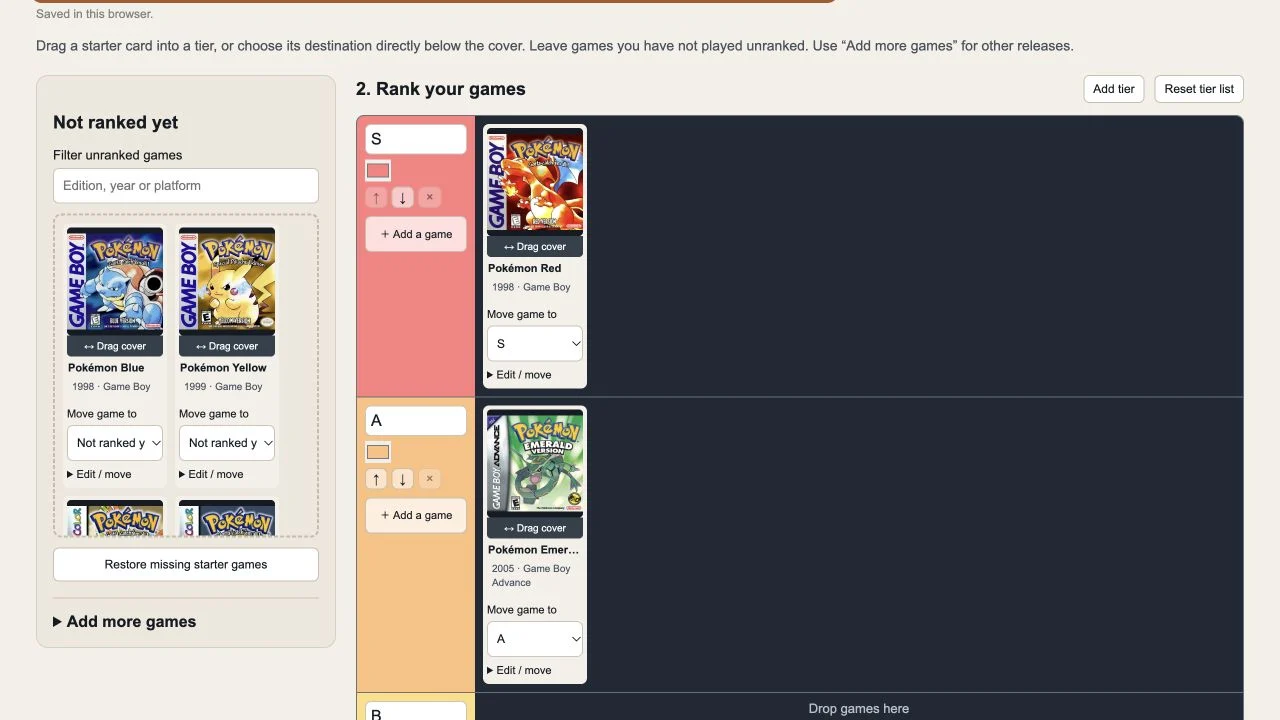
Choose a tier below any cover without opening the editing options. Click the image to enlarge. Download and attach the finished PNG
Once a game is in a tier, “Download PNG” becomes available. Only ranked games appear in the image. Use “Share tier list” to choose an app, then attach the PNG when needed.
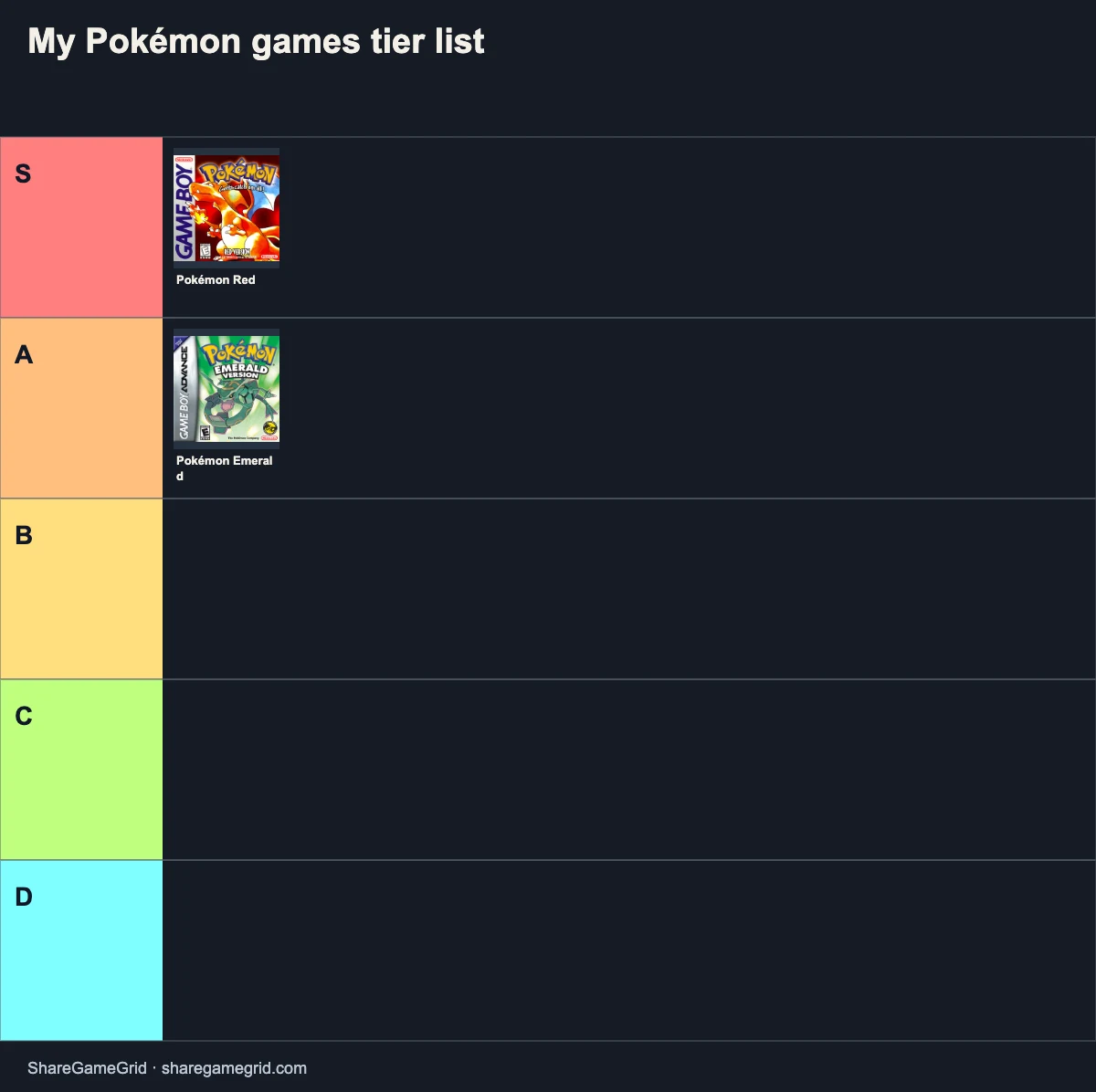
A real PNG export from this walkthrough. These two placements are an example of personal preference.
Make my Pokémon games tier list ↑
Is Legends: Z-A included? Can I add spin-offs?
Legends: Z-A is included with its cover in the 38-game starter pool. If you have an older saved draft, use “Restore missing starter games” to add missing cards without overwriting your ranking. The starter pool is not every Pokémon release: use “Add more games” for spin-offs or other titles. Check the version before adding it; you can also enter a title manually and upload an image you may use.
Your taste, in three steps
Add games, move them into tiers, then export. Your title and labels are yours to change; there are no official scores.
Questions about personal game tier lists
Can I change the number and names of tiers?
Yes. Add or remove empty tiers, change their order and colors, and edit every label. The ranking expresses your own preferences.
Wikidata (CC0) · Choose the game and version. Year and platform help distinguish similar titles.
Rank the Pokémon games you actually played
This Pokémon game tier list maker compares your experiences with the games. It does not rank individual Pokémon, competitive teams or trading cards. Start by deciding what you want to compare: your first playthrough, replay value, or your overall enjoyment.
Keep originals, remakes and sequels separate
Gold and HeartGold are different cards, as are Diamond and Brilliant Diamond. Black 2 is a sequel, not an alternative name for Black. The pool also separates paired editions, so you can rank only the version you played. Remove the other edition using its card controls if you do not need it.
“Not played” is not the lowest tier
Leave an unfamiliar game in the unranked pool. Only games you place into a tier appear in your PNG. You can place multiple games in one row as a tie, or explain in your caption that left-to-right order matters. Our sample labels are a starting point, not a published consensus or official score.
Make it your own and share the result
Change the title, rename S–D, add or remove empty rows, and upload covers you have permission to use. On a phone, use each card’s destination menu if dragging is awkward. Download your PNG, then attach it in the social app you choose. The link opens this template; it does not restore your private board.
What is included?
The 38-card starter selection covers selected English editions through Legends: Z-A (2025). Z-A uses one card for the Switch game and its enhanced Switch 2 edition; it is not a pair of different Pokémon versions. DLC and spin-offs such as Pokémon GO and New Pokémon Snap are not preloaded. Add anything missing with the search box or a manual title. Years refer to the first English release and may differ from Japanese and European launch dates.
Already have a saved board? Use “Restore missing starter games” to add missing starter cards, including Z-A, without replacing your title, tiers or existing placements.
View the starter game list
- Pokémon Red — 1998, Game Boy
- Pokémon Blue — 1998, Game Boy
- Pokémon Yellow — 1999, Game Boy
- Pokémon Gold — 2000, Game Boy Color
- Pokémon Silver — 2000, Game Boy Color
- Pokémon Crystal — 2001, Game Boy Color
- Pokémon Ruby — 2003, Game Boy Advance
- Pokémon Sapphire — 2003, Game Boy Advance
- Pokémon Emerald — 2005, Game Boy Advance
- Pokémon FireRed — 2004, Game Boy Advance
- Pokémon LeafGreen — 2004, Game Boy Advance
- Pokémon Diamond — 2007, Nintendo DS
- Pokémon Pearl — 2007, Nintendo DS
- Pokémon Platinum — 2009, Nintendo DS
- Pokémon HeartGold — 2010, Nintendo DS
- Pokémon SoulSilver — 2010, Nintendo DS
- Pokémon Black — 2011, Nintendo DS
- Pokémon White — 2011, Nintendo DS
- Pokémon Black 2 — 2012, Nintendo DS
- Pokémon White 2 — 2012, Nintendo DS
- Pokémon X — 2013, Nintendo 3DS
- Pokémon Y — 2013, Nintendo 3DS
- Pokémon Omega Ruby — 2014, Nintendo 3DS
- Pokémon Alpha Sapphire — 2014, Nintendo 3DS
- Pokémon Sun — 2016, Nintendo 3DS
- Pokémon Moon — 2016, Nintendo 3DS
- Pokémon Ultra Sun — 2017, Nintendo 3DS
- Pokémon Ultra Moon — 2017, Nintendo 3DS
- Pokémon Let’s Go, Pikachu! — 2018, Nintendo Switch
- Pokémon Let’s Go, Eevee! — 2018, Nintendo Switch
- Pokémon Sword — 2019, Nintendo Switch
- Pokémon Shield — 2019, Nintendo Switch
- Pokémon Brilliant Diamond — 2021, Nintendo Switch
- Pokémon Shining Pearl — 2021, Nintendo Switch
- Pokémon Legends: Arceus — 2022, Nintendo Switch
- Pokémon Scarlet — 2022, Nintendo Switch
- Pokémon Violet — 2022, Nintendo Switch
- Pokémon Legends: Z-A — 2025, Nintendo Switch / Switch 2
Check editions in the official Pokémon game directory. Cover thumbnails are sourced from Libretro and GameTDB; artwork belongs to its respective rights holders. ShareGameGrid is an independent fan-made tool and is not affiliated with Pokémon or Nintendo.